How would you like to be a Guest Blogger for KMI? Email us at: info@kminstitute.org and let us know your topic(s)!

The Challenges of Integrating Physical Documents Into a Digital Knowledge Base

December 12, 2025
Guest Blogger Devin Partida


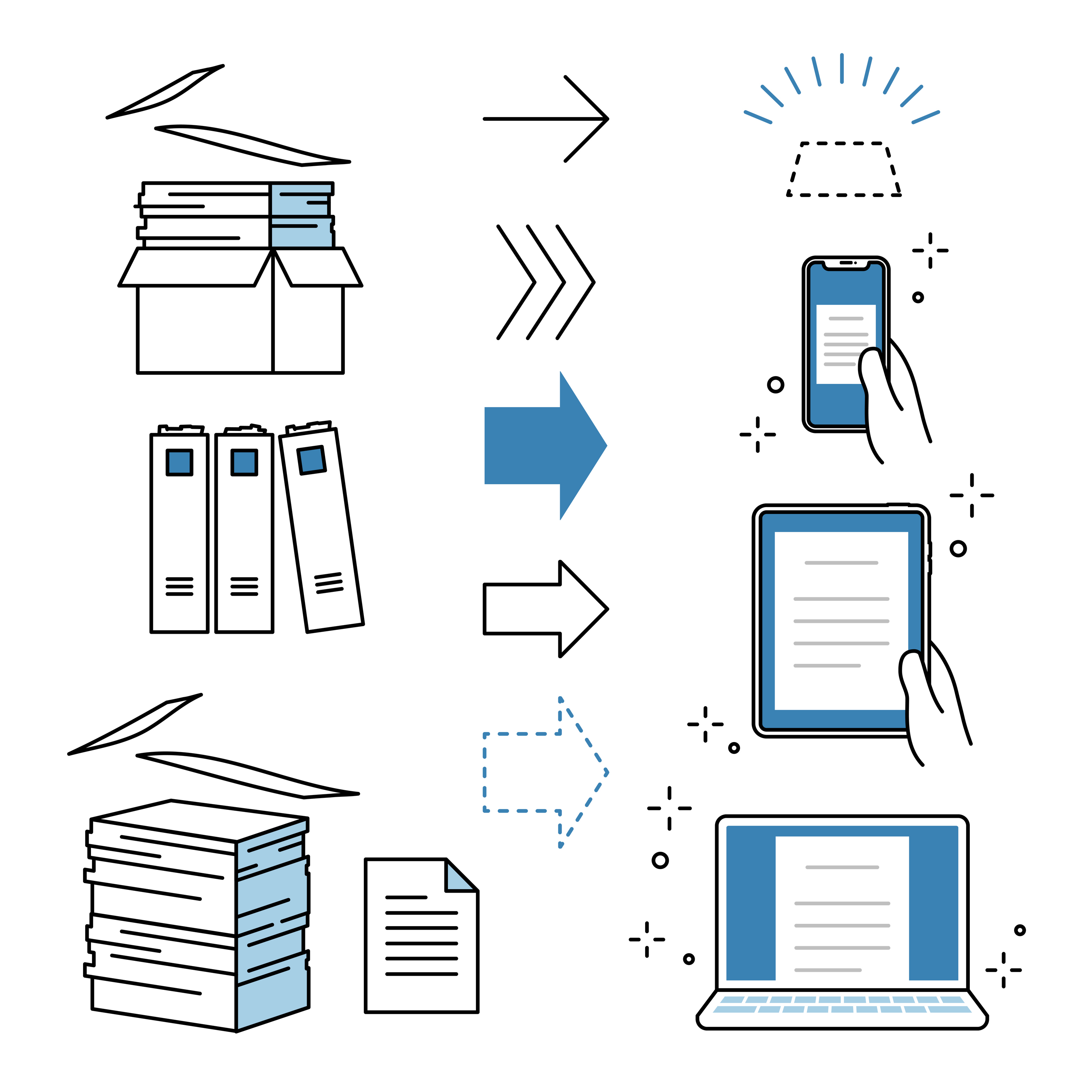
A digital knowledge base is a company’s main source of information and guidance. However, it can be challenging to integrate physical documents into it, impacting long-standing organizations with decades of files and historical records.

Paper records require specialized processes to ensure they are ready and helpful in a new electronic environment.

‍

‍

‍
Document Triage and Selection

Before any scanning or digitizing project begins, organizations first need to decide what they should include. In this step, known as document triage, knowledge management practitioners review information and assess its suitability for a specific purpose. In this case, it’s digitization.

Despite seeming simple, document triage can be complex, and any missteps can impact costs or disrupt the knowledge base.

When evaluating which physical documents are worth digitizing, teams can consider the following:

●  Regulatory and compliance requirements: Documents like tax records, contracts, financial statements and employment records often require verified digital versions for audits or legal purposes.

●  Business value and frequency of access: Frequently used documents, like operational procedures, can help streamline processes and contribute to the company’s ROI when digitized.

●  Historical significance vs. utility: Some materials hold memories but offer limited practical business value. While preservation is important, professionals need to weigh the costs vs. the benefits.

One example is the digital transformation of daily business mail. These correspondences are part of everyday operations. However, it can be challenging to manage and secure physical mail and documents on a larger scale, especially when companies transition to hybrid or remote working arrangements.

Business mail checks most of the major criteria for document triage. It’s essential in compliance and operations and gets used regularly, making it a key focus area for an organization’s digitization efforts.

Technical Hurdles in the Digitization Process

Once the team selects and categorizes their documents, they undergo the technical digitization process. Scanning is one part of it. However, some organizations may run into these issues.

Ensuring High-Fidelity Scanning and OCR Accuracy

Physical documents sometimes come with flaws, such as faded ink, stains, creases or other damage from age or storage. These issues can impact the effectiveness of optical character recognition (OCR) software when scanning and detecting text, even when using AI enhancement tools.

OCR accuracy is essential for the knowledge base to receive the right information and context from each document. Errors in capturing text and symbols can affect search functionality and other workflows that rely on the digitized data.

Poor source quality is a significant barrier to accuracy, requiring companies to rely on advanced scanning equipment and manual quality control to ensure information fidelity.

The Complexity of Metadata and Indexing

Metadata is foundational to a functional digital knowledge base. However, the process of adding it to digitized documents can be highly meticulous.

Some documents may automatically include basic metadata, such as creation date, author or document type. However, knowledge bases need rich and searchable metadata, like project codes or subject matter tags, for them to be functional in everyday operations

Several challenges can complicate this process. Physical documents rarely contain clear and standardized metadata, and legacy filing systems may have inconsistent or outdated categorization. Organizations themselves may also lack a shared metadata schema across departments.

Digitization teams must interpret the document, assign relevant metadata points, and apply a uniform system that matches how the knowledge base organizes files and information. This step ensures that scanned files are useful and accessible to anyone who needs them.

Overcoming Integration and Governance Challenges

After digitizing paper documents, knowledge base specialists will need to ensure that the digital versions function properly inside the system.

Creating a Unified Digitization Workflow

An effective workflow ensures that each document moves through the same controlled process and comes out with similar levels of quality as the others. A systematic workflow usually includes:

  1. Preparation (e.g., removing staples, sorting)
  2. Scanning and quality control
  3. Metadata association
  4. Ingestion into the knowledge management system
  5. Physical document storage or destruction

Selecting the Right Technology Stack

Assembling the right tech stack can improve a project’s chances of success. Aside from scanners and OCR, teams need a software ecosystem that can effectively support the rigors of document digitization and integration.

Knowledge management professionals may want to consider intelligent document processing (IDP) software, which uses AI and machine learning to classify documents and improve accuracy beyond basic OCR functionality. IDP still uses OCR to recognize text and symbols in the document, then takes it a step further by interpreting the document and gleaning relevant insights from it.

Ensuring Long-Term Governance and Maintenance

Knowledge management requires long-term commitment. After digitization, teams must plan for long-term governance and maintenance.

A comprehensive governance plan should include data retention policies, access control reviews, and periodic audits to ensure the accuracy and consistency of the digitized information.

Setting these systems up preserves all the hard work involved in the digitization process and ensures the utility and longevity of the entire knowledge base.

From Physical Archive to Actionable Knowledge

Integrating physical documents into a digital knowledge base comes with significant challenges that require meticulous processes and advanced technology to overcome. Creating a knowledge base is a long-term organizational commitment.

However, these efforts are often worthwhile, transforming physical documents into searchable and accessible digital libraries that support informed decision-making.

AI and KM Update: Vibe Coding Hits the Enterprise - The Death of "I Can't Code"

December 10, 2025
Rooven Pakkiri

‍

Google Cloud CEO Thomas Kurian and Replit CEO Amjad Masad just dropped a partnership that changes everything about who gets to build software in your organization.

The goal? "Make enterprise vibe-coding a thing” says Masad. And the implications are massive.

‍
The New Reality

"Instead of people working in silos, designers only doing design, product managers only write...now anyone in the company can be entrepreneurial “ Masad explains.

Translation: Your HR team can build their own tools. Your salespeople can create custom dashboards. Your marketing folks can prototype their own automation.

No tickets. No backlogs. No "waiting for dev."

Why This Matters for KM

This is where knowledge management meets its inflection point. When vibe coding democratises software creation, you're not just automating tasks—you're enabling people to externalise their tacit knowledge directly into functioning systems.

Think about the SECI model. The salesperson who knows the perfect qualification workflow can now build it themselves. The customer service rep with deep process knowledge can create the tool that captures it.

Knowledge doesn't get stuck in someone's head or lost in a ticket queue. It becomes software.

The AI Centre of Excellence Play

But here's the critical piece most organisations will miss -  Democratisation without Orchestration is chaos.

This is where an AI Centre of Excellence becomes essential. You need a hub that:

•Curates the best vibe-coded solutions across the organization

•Shares proven patterns and successful apps

•Ensures governance without killing innovation

•Transforms individual experiments into organizational assets

•Replit grew from $2.8 million to $150 million in revenue in under a year. The enterprise is ready. But without a CoE, you'll have 1,000 isolated solutions instead of 10 transformative ones.

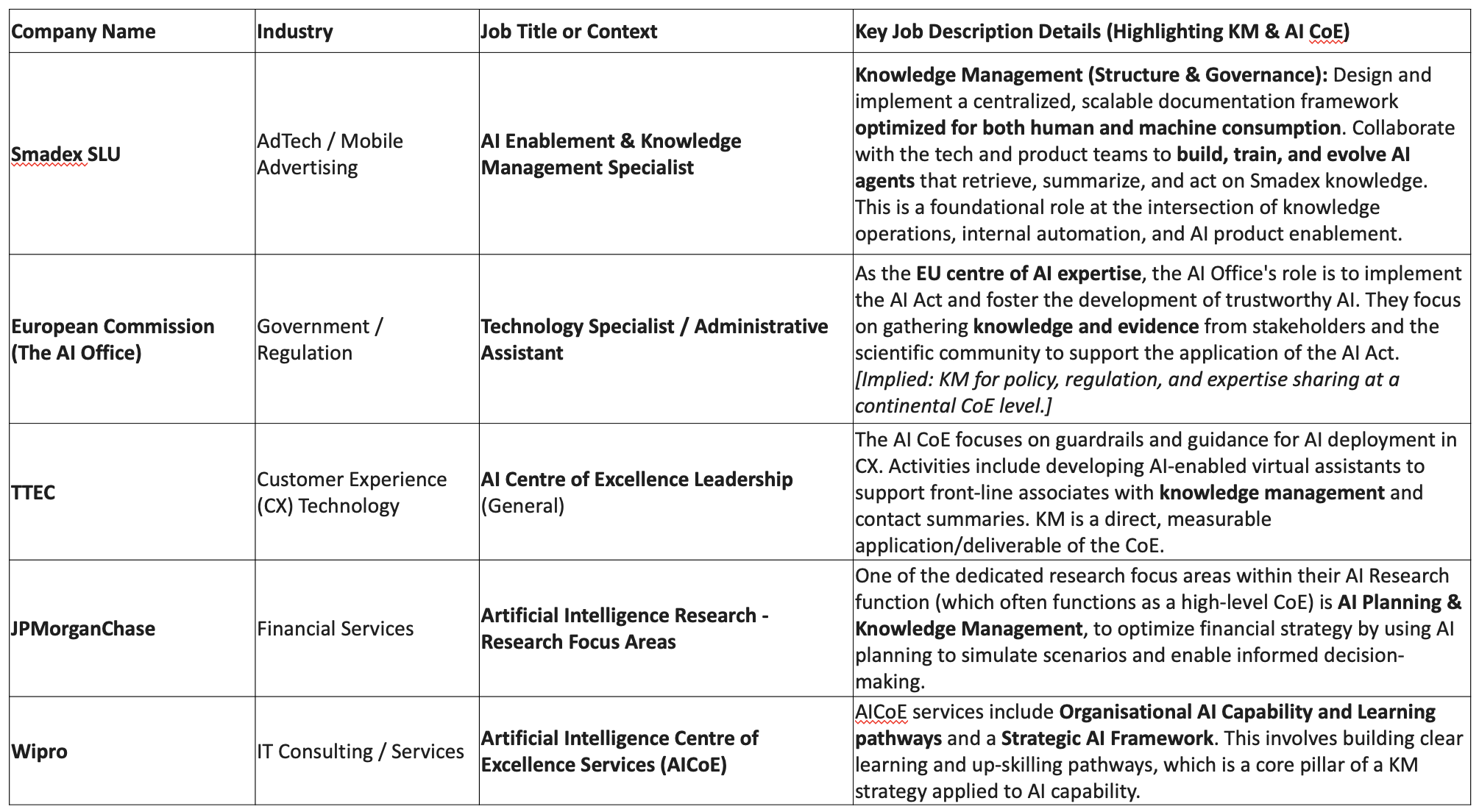
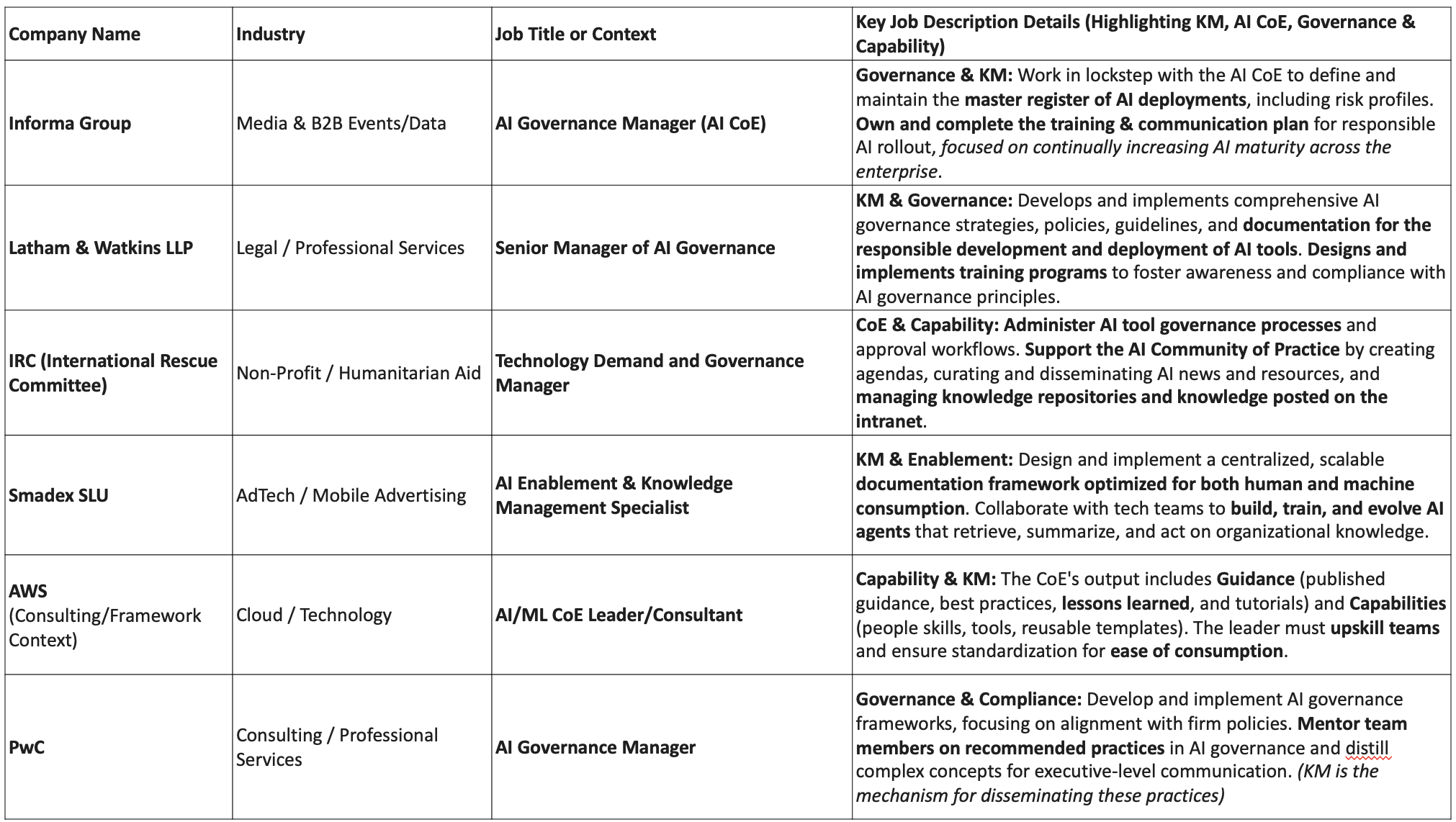
NB: We’re currently seeing AI COE’s running at 20% of our CAIM students to date. I predict that number will easily go north of 50% this time next year.  (see: sample job examples below) 

The Certified AI Manager Connection

This is exactly what we demonstrate in the Certified AI Manager Course —using Claude to vibe code business solutions with human centric KM at the centre.

P.S. or Footnote:  When you start to realize that this phase of AI actually eats software, the $3 billion valuation of Replit and Cursor's $29.3 billion valuation don't seem so crazy after all. And when you consider Anthropic's Claude Code hit $1 billion in run-rate revenue —the very tool powering much of this vibe coding revolution—you start to see we're not just witnessing a shift in how software gets built. We're watching software consumption replace software purchase. They're not just selling tools—they're selling the dissolution of the software industry as we knew it.

Knowledge Management Roles within AI Centre of Excellence Contexts

Knowledge Management & Leadership Roles in the AI Centre of Excellence

Contact your KMI rep for larger image/full-size charts

Top 7 OKR Tools That Boost Knowledge Capture & Transfer

August 28, 2025

According to a study by OKR Mentors, nearly 50%
of the Fortune 500 companies currently utilize OKRs (Objectives and Key Results), and 70% of those companies align them with their business strategy.
With OKRs forming a critical part of the operational framework in most companies, organizations are constantly looking for scalable solutions to level up their business strategies.

More importantly, when created and managed correctly, OKRs can improve employee performance by 20% and elevate employee retention rates by 15%. As a result, organizations can implement frequent feedback cycles and establish clearer alignment between goals and their strategies. 

With that in mind, let us first establish the connection between OKRs and their role in capturing and transferring knowledge within organizations.

How OKRs Can Contribute to KM Success?

OKRs can help organizations — whether they are startups or enterprises — ensure that each employee is aligned and accountable for work that is impactful and contributes to the overall knowledge strategy and business strategy. 

No wonder, more than 80% companies now prefer to employ OKR coaches and mentors who can help them drive knowledge sharing and best practices with the help of OKRs.

By opting for AI and tech-enabled OKR tools over spreadsheets, you can provide real-time feedback, progress tracking, reminders, and streamline documentation and knowledge-sharing. With the help of AI-powered features, you can leverage weekly check-ins, shared dashboards, and collaborative notes to empower your knowledge management process.

7 Top OKR Tools You Must Consider For Knowledge Capture & Transfer

Now that we have understood how OKRs contribute to knowledge sharing and management, let us explore the top OKR tools that can help you align your OKRs with your knowledge capture and transfer process.
‍

#1 OKRs Tool

‍

OKRs Tool is a fairly straightforward, lightweight, and AI-powered platform that empowers organizations and team leaders to enable team alignment and conduct hassle-free tracking of goals. The easy-to-use interface and dashboards make it easier for even novice users to add, track, and manage their OKRs effectively. 

Documentation and Collaboration Features for KM

  • Generate and recommend tailored objectives and goals with AI-powered features
  • Integrate Slack updates and weekly check-ins seamlessly to facilitate knowledge sharing
  • Access progress dashboards that give you real-time insights into your OKRs and highlight contributions by individual employees and teams
  • Prioritizes clarity, making capturing, transferring, and sharing knowledge easier

Best for: Early-stage startups, companies, and scaling teams that want to balance speed and affordability for OKR tracking and knowledge management.
‍

#2 Weekdone

‍

If you are looking for a tool to help manage your weekly tasks, lists, and deliverables while ensuring alignment with OKRs, Weekdone is a great option. Combining weekly reporting and OKR management within a simple interface, Weekdone is popular among small teams seeking a tool that facilitates regular team alignment and feedback. 

Documentation and Collaboration Features for KM

  • Offers features that boost visibility and tracking of goals and OKRs with visual dashboards 
  • Get insights about your OKR progress with engagement stats and pinpoint the major contributors and necessary knowledge areas
  • Supports remote and hybrid teams by offering features for asynchronous sharing

Best for: Startups and small businesses that require visual progress tracking and structured check-ins.
‍

#3 Mooncamp

‍

Looking to develop a culture centered around people and ideal outcomes? Mooncamp can help you achieve that easily by aligning OKRs with your weekly tasks and strategies, using a beautiful and intuitive platform. With Mooncamp, you can visualize your goals, OKRs aligned with knowledge management, and KPIs, and organize them in a framework that works with your needs.

Documentation and Collaboration Features for KM

  • Create easy-to-track goals with drag and drop OKRS, and create real-time progress maps to maximize overall performance
  • Visualize your overall strategy with an aesthetically pleasing and comprehensive dashboard
  • Align OKRs between different teams in your company to maximize knowledge transfer and ensure it is directly related to business outcomes

Best for: Small and mid-sized teams looking to implement transparent and goal-driven collaborations.
‍

#4 Perdoo


Perdoo
is an OKR-tracking platform that merges OKR management with broader performance, helping teams link strategic goals with operational results. As a result, your teams and individuals will have more clarity on the most crucial goals and KPIs. 

Documentation and Collaboration Features for KM

  • Seamlessly integrate OKRs with KPIs to get complete visibility and clarity across projects and strategies
  • Features that let you appreciate and share real-time feedback with your team members, so that you can foster better team engagement and document achievements
  • Create strategy maps that can easily visualize hierarchical relationships and dependencies

Best for: Growing organizations that are looking for robust performance tracking and strategic alignment features.
‍

#5 Tability

‍

Tability can help you track OKRs easily by offering real-time progress maps and seamless onboarding. The platform can also help you get deeper insights into your performance while automating most parts of OKR management, thanks to AI-powered features.

Documentation and Collaboration Features for KM

  • Automate weekly check-ins and reminders, and collaborative reminders to empower powerful collaborations within the team
  • Create customizable goal templates and visuals that help you get deeper insights into your real-time performance
  • Generate clear and visual dashboards that can help you share project progress and updates more easily, enabling knowledge transfer

Best for: Teams and startups that are growing rapidly and want to balance speed and streamlined knowledge workflows.
‍

#6 Peoplebox

If you want a single platform that can handle all your people management, performance management, and OKR management processes, Peoplebox is a great tool to consider. With a user-friendly module to manage your OKRs, you can closely integrate knowledge sharing with overall team communication and feedback.

Documentation and Collaboration Features for KM

  • Access real-time dashboards, automated reminders, and goal alignment features to simplify knowledge capturing and boost accountability
  • Get support for collaborative documentation to manage the sharing and transfer of knowledge more easily
  • Enable transparent outcome sharing with appropriate access controls so that all employees get a clear view of the overall performance and OKRs

Best for: Teams that value broader integration and faster adoption cycles for streamlining knowledge management
‍

#7 Workboard

Workboard AI can help you map objectives and OKRs to specific tasks in your core processes, so that you can align and drive strong outcomes. With the help of scorecards, AI drafts, and functional alignment, you can update knowledge areas like never before and get better visibility into your overall business performance.

Documentation and Collaboration Features for KM

  • Track all your documentation and feedback cycles so that you can exchange and share knowledge more easily
  • Access performance dashboards with visuals and real-time insights so that you get better visibility into your goals and objectives
  • Design your system to identify bottlenecks more easily, and enable cross-functional knowledge sharing and management

Best for: Organizations wanting access to enterprise-grade analytics that connect to knowledge documentation and insights.

Concluding Remarks

OKRs have been known to be helpful to organizations that want to navigate their business strategies and performance with transparency and clarity. Invest in a robust OKR tool that will help you achieve your goals while aiding you with knowledge capture and transfer. By choosing solutions that offer features to boost documentation and collaboration within the team, you can foster a culture of transparency, recognition, and continuous learning without having to worry about anything else.

___________________________
Optimizing Hardware Setups for Effective Knowledge Management Systems

March 10, 2025
Guest Blogger Devin Partida

Knowledge management systems (KMSs) are understated yet critical resources in modern digital infrastructure. They are the pillar of data collection, storage, organization and collaboration. Every industry operates with unprecedented volumes of information, demanding quality hardware and the best experts to oversee them. How can professionals prime themselves and their KMSs for future proofed success?

‍

What Are Hardware Requirements for KMSs?

The hardware behind a KMS determines its stability and scalability. The machinery must be able to handle holding and processing high volumes while having enough room to expand as more data comes in. Minimum requirements vary based on how many concurrent users there are within the KMS at a time.

Servers

To handle many users simultaneously, servers should have at least quad-core processors. This performance power will prevent any delays in working within the KMS during peak time. Memory is also crucial.Enterprise levels should consider up to 32 gigabytes or more, while smaller organizations may be able to justify less than eight.

Redundancy is another essential part of server management, as it encourages innovation and enhances security. Knowledge managers can suggest these tactics to make sure resources are available when needed:

●     Load balancing

●     Automatic failover enabling

●     Server clusters

●     Power supply redundancy

Storage Solutions

Hard-disk drives are not suited for the storage needs of dense data. Multiple solid-state drives, including some external solutions, are ideal for security and speed but cost more.These build redundancy and safety if there is a compromise. Fast data recovery with on- and off-site disconnected, immutable storage is critical for business continuity.

Companies will need to pick between network attached storage (NAS) or storage area networks (SANs). The former is better for tighter budgets and gradual scaling, while the latter is more labor-intensive from an administration perspective but better supports larger entities.

Network Infrastructure

KMSs require high-speed internet, Fiber is the best option for companies today, though it may not be available in all areas.It supports rapid data transmission and retrieval, even in large quantities. IT professionals should configure the network to have as low latencies as possible so people can collaborate as closely in real time as possible.

Additionally, the network must be secure. KMS soften contain private, sensitive information demanding the utmost care in risk prevention. This includes firewalls and intrusion detection systems in addition to expanded digital hygiene like staff training. Thorough education and cybersecurity awareness is vital for the 83% of surveyed companies leveraging bring-your-own-device schemes.

How Do Experts Choose the Right Infrastructure?

Workforces can know the minimum requirements and strategies for what the KMS should look like, but knowing how to pick the right machinery and products demands a plan. Here is how to get started.

Assess Data Volume

Knowledge management leaders should review the organization’s current data storage and transmission needs. They should also speak with stakeholders to discover any scaling plans and how much they anticipate future clients will put pressure on data storage in the future.

Identify Performance Needs

Determining performance minimums includes asking questions like how frequently the company uses the cloud or misses project deadlines because of transfer delays. Those in knowledge management should also consider the current condition of the KMS’s organization and data integrity.

If an overhaul is necessary, employees should consider high up-front performance demands, even if it may exceed a standard working day. Digital transformation and optimization efforts require a lot of resources.

Know Budget Constraints

Balancing strong internet, robust storage and high-performance software requires a clear budget. Calculations on affordability should consider the total cost of ownership, investments in upgrades and maintenance, and a safety net in the event of a cyber security incident.

Companies can shave expenses by building relationships with various vendors and see if there are financing options available, though corporations should always research the third party’s reliability and hardware support.

Tips on Future proofing Hardware and Data Investments

These techniques can ensure the KMS is well-protected and long-lasting.

Choose Modular

If scalability is a question, modular servers and storage could allow the gradual implementation of expanded KMS structures.This choice erases hesitancy or guilt for not purchasing higher-end products or feeling like the business has been locked out of growth. Every device, including servers, can have expandable slots for RAM and storage.

Consider Hybrid Setups

Using cloud infrastructure alongside hardware for KMS solutions makes organizations more flexible. It does not demand as muchof an overhaul of the current infrastructure but could support a slow transition if this is the goal. This technique may be most effective if working alongside a global team that needs areal-time, collaborative digital environment.

Monitor Trends

How do colleagues interact with the hardware, physically and in digital environments? What threats do cybersecurity analysts face daily? These pressures on the KMS equipment inform numerous ways to preserve the system’s longevity and ensure high returns on investment. Here are some ways regular hardware auditing can help: 

●     Informs employee training program needs

●     Establishes greater likelihood of cybersecurity compliance

●     Encourages proactive instead of preventive or reactive maintenance

The Knowledge Behind KMS Execution

Optimizing hardware for long-term KMS functionality is a constant balancing act. It requires sturdy components alongside behavioral changes from workers. KMS staff must practice safe data management while remaining adaptable to expansion. As experts monitor their hardware for health, they should always think of ways to improve its life span and performance to anticipate the needs of the data-driven future.

‍